

|
|
|
There are eleven objects to consider in the HTML object model:
These objects are organized in the following hierarchy (the dotted line following an object indicates that multiple objects may exist):
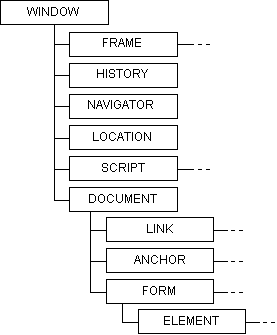
Each of these objects has its own rules for scoping and containment.
The top level object is a window. Every window contains:
The window object properties can be referenced directly by scripts while in the window scope. So, for example, script authors do not need to type:
window.name
to reference the window name; instead, it is sufficient just to type:
name
Note also that it is possible to call scripts from one window object to another. So, to execute the script myscript in the topmost window, use:
top.myscript( )
The document object is one level below the window object. This object contains:
Because scripts live with the window object, not the document object, the script author must type document.property to access document properties. So, to get the title of the document, the author can type:
<script language="VBScript">
'...
string1 = document.title     -put the document title into string1
'...
</script>
To access the forms in a document, the author can either refer by name or through the form array. So, for the following form:
<form name="Form1">
     <input type="button" name="Button1" value="Press ME" onClick="pressed">
</form>
the author can access the object named button1 by name:
<script language="VBScript">
sub pressed
   document.Form1.Button1.value="I've been pressed"  '   access the form by name
end sub
</script>
by index:
<script language="VBScript">
sub pressed
     document.forms(0).Button1.value="I've been pressed"   '   access the form by index
end sub
</script>
or by index name and array reference.
Scripts can refer to contained elements that are not form types directly, without using document. So, for example, if the authors create an object called myObject, they can reference it directly in script as follows:
<object name="myObject" ... >
</object>

<script language="VBScript">
sub foo
     myObject.color = "green"     - access the form by index
end sub
</script>
The form object contains:
A script can reside either in a form or in a window. If a script lives outside the form, it needs to access the elements in the form, either by name or through the form array (see the example in "The Document Object"). If, however, the script element is inside the form, it can access the elements in the form directly.
<form name="Form1">
     <input type="button" name="Button1" value="Press me">
     <script for="Button1" event="onClick" language="VBScript">
          alert "I've been pressed"
          document.Form1.Button1.value="Click"
          Button1.value="Click"
     </script>
</form>

<script language="VBScript">
sub foo
     document.Form1.Button1.value="Click"
end sub
</script>
|
|
|